






Skip to content

Enterprise DAM

Manage all your digital assets in one platform built for complex organizations. Control metadata, rights, workflows and distribution across teams, markets and channels.

Extensions of QBank DAM

Extend QBank to match how your organization works. Add automation, templates, portals and custom functionality when you need it.

Connectors & integrations

Connect QBank to the tools your teams already use. From creative tools and CMS platforms to marketing and product systems.

QBank-menu-news
Share assets beyond your organization

Create branded portals where partners, distributors and teams can easily find and download the right assets.

No outdated files. No endless email threads.

QBank DAM for enterprise organizations

Built for complex organizations that need more than asset storage. QBank helps teams across departments, markets, and industries manage, control, and activate digital assets from one governed source.

QBank-manufacturing-menu-rounded-1
Made for manufacturing complexity

Support product communication, technical documentation, and partner access across global teams, product lines, and systems.

QBank-medtech-menu-rounded-600
Built for medtech compliance

Keep digital assets controlled, traceable, and accessible across regulated workflows, teams, and external audiences.

QBank-retail-menu-rounded-1
Designed for retail speed

Help teams manage and distribute approved campaign, product, and brand content across channels, markets, and seasons.

Built for real content workflows

Explore how QBank supports the workflows that matter most across teams, markets, and systems.

Use case - Manage product content across markets
Manage product content across markets

Give global and local teams one structured way to manage approved product content, adapt it for market needs, and keep it consistent across channels.

Use case - Ensure compliant asset versioning
Ensure compliant asset versioning

Keep approved assets under control with clear version history, structured approvals, and traceability across regulated teams and systems.

Use case - Distribute approved content across systems and channels
Distribute approved content across systems and channels

Distribute approved content across websites, platforms, and downstream environments from one controlled source.

Use case - Reduce duplicate assets and improve content reuse
Reduce duplicate assets and improve content reuse

Centralize approved assets, reduce unnecessary duplication, and make it easier to reuse content across teams, systems, and channels.

Use case - Automate content production
Automate content production

Automate repetitive production tasks and keep content work moving faster across teams and workflows.

Sofie Samrell05-02-20192 min read

Integrate your DAM with Photoshop

Photoshop is the most wonderful tool, and lots of Marketers best friend. But if it isn’t integrated with your solution for storing assets and images, it isn’t the most efficient collaboration. We let you in on how to integrate it with QBank Digital Asset Management.

If you have come as far as adding a DAM to you Martech Stack, that’s great. Then you can keep track of your digital assets and push them out in chosen communications channels. Working with images and content production it's also necessary to have a creative tool, like Photoshop. 

Simpler editing you can do in QBank, as auto-crop and resizing of images or illustrations. This is done by setting up a template with desired size and resolution to fit your specific channels, for example Facebook headers, Instagram posts or different website image templates.

Since Photoshop is not just a tool for cropping and resizing, many Marketers' use it to add text and other graphical elements to images and illustrations. Editing that cannot be done in QBank. QBank can not take the place of Photoshop, instead we suggest an integration between the two.

QBank Photoshop Connector

Adding a Photoshop Connector to your DAM is a way of enabling higher team efforts and efficiency. The connector enables you to reach your assets stored in QBank, from within the Photoshop interface. In other words, you open your assets from within Photoshop, edit the asset and then save it as a new version of your asset or as a completely new asset – straight back into QBank.

Instant Access

Below is a couple of screenshots on how the connector looks from within Photoshop. In the QBank window you can search for the specific image you wish to open.
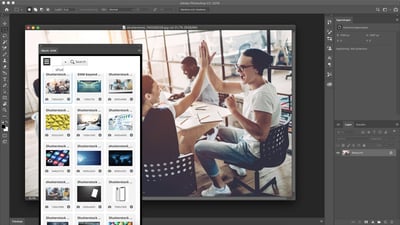
QBank Photoshop Connector

When you found the image you wish to open, double click and chose if you want to open the original file or if you intend to create a new asset. When you are done editing you can upload it by choice.
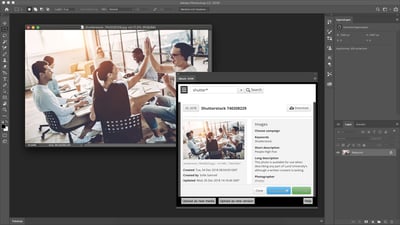
QBank Photoshop Connector

Not only is the connector a great integration for your in-house Marketing Team but also a tool to support your external stakeholders. Let’s say you work with an ad agency who delivers banners and content to you. If they would add an integration between their Photoshop and your QBank, they could push your content straight into your DAM for approval or correctional rounds. And if that isn't an option, you can always use the QBank feature Moodboards for interactive teamwork.


Take me on a QBank Connector Tour

The best way to get to know our connector is to book a free demo with a QBank representative. We guide you through QBank and let you in on how the integration will turn your efficiency up.

BOOK A DEMO

avatar
Sofie Samrell
QBank's Marketing Manager since early 2016. Sofie has a passion for marketing, communications, and of course, DAM.

RELATED ARTICLES
