







Skip to content

Enterprise DAM

Enterprise Digital Asset Management. The content infrastructure behind great brands. Connect approved assets, metadata and workflows across teams and systems, with governance built in.

Extensions 

Add automation, templates, portals and custom functionality as your needs evolve

Integrations

Connect QBank to your CMS, PIM, commerce and more.

QBank-menu-news
Branded Portals

Give partner and teams easy access to approved, on-brand content. 

Enterprise organizations

One governed source for every team, brand and market.

QBank-manufacturing-menu-rounded-1
Manufacturing 

Connect product imagery, technical documents and partner content across global markets.

QBank-medtech-menu-rounded-600
Medtech

Keep regulated content approved, traceable and accessible to the right teams.

QBank-retail-menu-rounded-1
Retail

Get approved product and campaign content to every market and channel you sell in.

Built for real content workflows


Use case - Manage product content across markets
Product content across markets

Consistent product content in every market, global or local.

Use case - Ensure compliant asset versioning
Compliant asset versioning

Keep versions, approvals and usage rights clear and traceable.

Use case - Distribute approved content across systems and channels
Distribute content across channels

Get approved content to the platforms and channels that need it.

Use case - Reduce duplicate assets and improve content reuse
Reduce duplicate assets and reuse content

Make existing assets easier to find, share and reuse.

Use case - Automate content production
Automate content production

Automate repetitive tasks while keeping control over your content workflows.

Dynamic media optimization for Enterprise DAM

Dynamic media delivery in QBank, built to reduce duplicate assets and simplify publishing

QBank Media Optimization is designed to solve practical media delivery challenges. Instead of distributing multiple asset versions, it delivers the right format and size on the go based on the channel and context.

Often used in CMS integrations and similar setups, it helps teams create faster digital experiences while keeping media delivery more efficient.

Extend QBank DAM

Why use QBank Media Optimization?

Dynamic delivery instead of duplicate versions

Instead of storing and distributing multiple versions of the same asset, QBank Media Optimization delivers the right size, crop, and format dynamically based on where the asset is used. The PDF shows this with different outputs for hero, product, and blog images from one source asset.
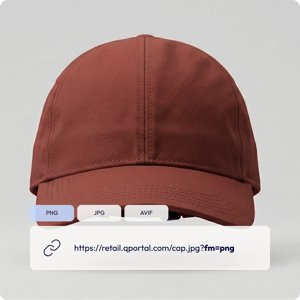
QBank DAM - QMO Dynamic URL

Lower storage costs

QMO reduces the need to store multiple renditions for different devices, channels, and use cases. The deck describes this as “one asset, endless possibilities,” with dynamic transformation replacing stored duplicates.

QBank DAM - Lower storage cost with dynamic URLs

Faster digital experiences

Optimized delivery and caching help websites and other digital touchpoints load faster. The deck highlights faster websites as a core benefit and includes a customer example with up to 63% storage savings alongside improved performance.

QMO - Better customer experience-1

A better fit for connected publishing

QMO works especially well in CMS integrations and similar setups where assets need to be delivered dynamically. Rather than preparing files manually, teams can configure how assets should be delivered by channel, device, and use case.


QBank DAM - QMO Connected Publishing
Use case - Reduce duplicate assets and improve content reuse
Use case

Reduce duplicate assets.
Reuse with control. 

Centralize approved assets, reduce unnecessary duplication, and make it easier to reuse content across teams, systems, and channels.

How it works in QBank DAM

1
Start with one source asset
Store one approved master asset instead of creating and managing multiple fixed variants.
2
Connect QMO to your CMS or publishing setup
Use a CMS connector or similar integration so your publishing environment can request assets directly through QMO.
3
Define how assets should be delivered
Set breakpoints, crop rules, sizes, and preferred output formats such as WebP or AVIF depending on the channel, browser, or device.
4
Deliver optimized media on demand
QMO generates and serves the right version dynamically, with caching to support faster delivery and a smoother user experience.

Built to work with your publishing setup

QBank Media Optimization works best when it is connected to the systems and rules that shape digital delivery. In practice, that means one approved source asset, connected publishing, dynamic transformations, and faster delivery across channels and devices.

Qbank-web-platform-single source of truth

Source asset control 

Work from one approved master asset instead of storing and managing multiple fixed versions for different channels and devices.

QBank - Features - Smart metadata and taxonomy

CMS and web integrations 

Use QMO with CMS connectors and similar integrations so websites and other web applications can request the right asset version directly at delivery time.
QBank - Features - Permissions without silos

Dynamic format and size rules

Define how assets should be delivered based on context, including breakpoints, crop settings, size, and output formats.
QBank - Feature - Workflows that scale

Caching and performance

Use caching and CDN-based delivery to support faster websites and smoother digital experiences.

Book-a-demo-background

Want to know more about this extension? 

Build on the QBank backbone with media optimization that delivers the right format and size on the go, reduces duplicate assets, and supports faster publishing across channels and devices.

Are your ready to go further?

Start with a digital asset management demo. Whether you’re starting fresh or rethinking what you have, we help you move forward with confidence.