Skip to content

Enterprise DAM

Manage all your digital assets in one platform built for complex organizations. Control metadata, rights, workflows and distribution across teams, markets and channels.

Extensions of QBank DAM

Extend QBank to match how your organization works. Add automation, templates, portals and custom functionality when you need it.

Connectors & integrations

Connect QBank to the tools your teams already use. From creative tools and CMS platforms to marketing and product systems.

QBank-menu-news
Share assets beyond your organization

Create branded portals where partners, distributors and teams can easily find and download the right assets.

No outdated files. No endless email threads.

QBank DAM for enterprise organizations

Built for complex organizations that need more than asset storage. QBank helps teams across departments, markets, and industries manage, control, and activate digital assets from one governed source.

QBank-manufacturing-menu-rounded-1
Made for manufacturing complexity

Support product communication, technical documentation, and partner access across global teams, product lines, and systems.

QBank-medtech-menu-rounded-600
Built for medtech compliance

Keep digital assets controlled, traceable, and accessible across regulated workflows, teams, and external audiences.

QBank-retail-menu-rounded-1
Designed for retail speed

Help teams manage and distribute approved campaign, product, and brand content across channels, markets, and seasons.

Built for real content workflows

Explore how QBank supports the workflows that matter most across teams, markets, and systems.

Use case - Manage product content across markets
Manage product content across markets

Give global and local teams one structured way to manage approved product content, adapt it for market needs, and keep it consistent across channels.

Use case - Ensure compliant asset versioning
Ensure compliant asset versioning

Keep approved assets under control with clear version history, structured approvals, and traceability across regulated teams and systems.

Use case - Distribute approved content across systems and channels
Distribute approved content across systems and channels

Distribute approved content across websites, platforms, and downstream environments from one controlled source.

Use case - Reduce duplicate assets and improve content reuse
Reduce duplicate assets and improve content reuse

Centralize approved assets, reduce unnecessary duplication, and make it easier to reuse content across teams, systems, and channels.

Use case - Automate content production
Automate content production

Automate repetitive production tasks and keep content work moving faster across teams and workflows.

The QBank Marketing Team28-06-20221 min read

Are You Ready for Your Best Holiday Season Yet?

The holiday season is upon us and you're probably looking for ways to increase efficiency, enhance collaboration and boost productivity. That's exactly why QBank is the go-to digital asset management system for retail brands. In this blog post we wanted to share with you some great QBank features that will make your days just a bit easier this holiday season.
Qbank-image-version-control
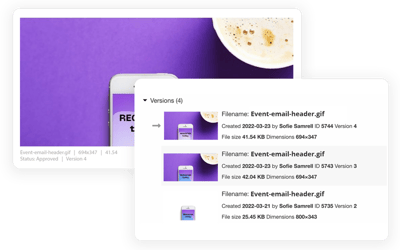
Keep track of new versions

Keeping track of versions can be time-consuming. Instead of adding new versions as a new media, QBank keeps track of your versions for you. You can always see the history of when a new asset has been added, and by whom. Always in control, always updated.

folderstructure-01Stop wasting time searching for your campaign assets
Keep all your assets related to a specific campaign in one place using the campaign folder feature. For instance, you can have one folder for Black Friday and another for Christmas. You can also filter on a date, a great feature since campaigns are usually tied to a specific timeframe and should not be available to publish after those dates.

Mockup-email-retailPersonalization at scale

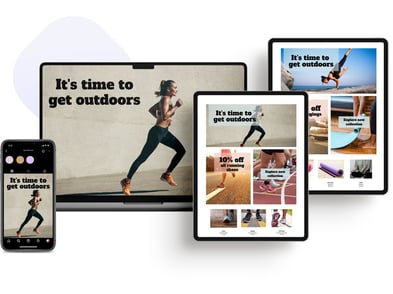
It can be incredibly time-consuming to tailor marketing campaigns to multiple markets and individual consumers. This is why we developed the Banner Builder feature. With the Banner Builder, you can auto-create campaigns with personalized content in QBank using approved images and predetermined templates. Maintain global brand consistency through e-mail campaigns, banners, and social media content while adapting your materials to your target audiences.
collaborate-holiday-02

Collaborate and share

Moodboards are key when collaborating with in-house teams and external agencies. You can use Moodboards to share texts for proofreading, or approval rounds for ads, banners, and artwork. The great thing about using this channel is that you document everything, from comments to new versions. Say goodbye to email attachments that were too large to send anyway.

some-holiday-campaign

Publish with ease

QBank will even make publishing your assets easier. Connect your QBank platform with your CMS, social media channels, reseller portals and share with your target audience in seconds.
 
Curious about how QBank digital asset management platform could help you this holiday season?


Have questions? Talk with one of our
QBank DAM experts.

Book a demo >


RELATED ARTICLES