





Skip to content

Enterprise DAM

Manage all your digital assets in one platform built for complex organizations. Control metadata, rights, workflows and distribution across teams, markets and channels.

Extensions of QBank DAM

Extend QBank to match how your organization works. Add automation, templates, portals and custom functionality when you need it.

Connectors & integrations

Connect QBank to the tools your teams already use. From creative tools and CMS platforms to marketing and product systems.

QBank-menu-news
Share assets beyond your organization

Create branded portals where partners, distributors and teams can easily find and download the right assets.

No outdated files. No endless email threads.

QBank DAM for enterprise organizations

Built for complex organizations that need more than asset storage. QBank helps teams across departments, markets, and industries manage, control, and activate digital assets from one governed source.

QBank-manufacturing-menu-rounded-1
Made for manufacturing complexity

Support product communication, technical documentation, and partner access across global teams, product lines, and systems.

QBank-medtech-menu-rounded-600
Built for medtech compliance

Keep digital assets controlled, traceable, and accessible across regulated workflows, teams, and external audiences.

QBank-retail-menu-rounded-1
Designed for retail speed

Help teams manage and distribute approved campaign, product, and brand content across channels, markets, and seasons.

Built for real content workflows

Explore how QBank supports the workflows that matter most across teams, markets, and systems.

Use case - Manage product content across markets
Manage product content across markets

Give global and local teams one structured way to manage approved product content, adapt it for market needs, and keep it consistent across channels.

Use case - Ensure compliant asset versioning
Ensure compliant asset versioning

Keep approved assets under control with clear version history, structured approvals, and traceability across regulated teams and systems.

Use case - Distribute approved content across systems and channels
Distribute approved content across systems and channels

Distribute approved content across websites, platforms, and downstream environments from one controlled source.

Use case - Reduce duplicate assets and improve content reuse
Reduce duplicate assets and improve content reuse

Centralize approved assets, reduce unnecessary duplication, and make it easier to reuse content across teams, systems, and channels.

Use case - Automate content production
Automate content production

Automate repetitive production tasks and keep content work moving faster across teams and workflows.

Umbraco connector in QBank DAM

Smarter asset control in Umbraco

Connect QBank with your CMS to publish faster, stay on-brand, and simplify asset delivery.

Why connect QBank to your Umbraco?

Stop uploading the same image twice. With QBank’s Umbraco connector, your team gets direct access to approved assets, right inside the CMS. Every file is published in the right format, with the right metadata, automatically.

  • One single source of truth for your media
  • Faster publishing with fewer errors
  • Always up-to-date, always on-brand
  • Support for dynamic formats and metadata
  • Easy to scale across teams and markets
Images for FAS 1 WEB (8)

How it works in 3 simple steps:

1
Browse and search
Your entire QBank library, searchable inside Umbraco. Use filters, metadata, and search folders to find what you need fast.

→ Supports tags, rights management, and custom taxonomies.
2
Embed on-brand assets
Drag and drop, or use dynamic links. Assets are published using the correct format, size, and metadata.

→ No more guessing file versions or re-uploading resized images.
3
Stay in sync
Need to replace a product image across 20 pages? Do it once in QBank. The change reflects everywhere the asset is used in Umbraco.

→ Full version control, always up to date.
QBank Media Optimizer (QMO)

Add QMO for next-level delivery

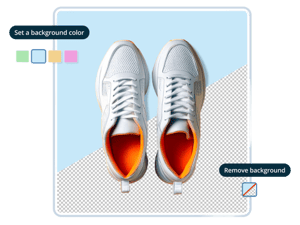
By combining this connector with QBank Media Optimizer (QMO), your Umbraco solution gets even smarter. QMO delivers dynamic URLs that serve optimized versions of your assets, resized, compressed, and tailored for every channel and screen. That means:

faster load times
lower bandwidth usage
reduced carbon footprint

QMO helps you move toward a more sustainable web, something close to heart for the Umbraco community, and for us.


Read more about QMO ››
QBank-QMO-set-remove-background-featured-image-1-1

Built to Last

This isn’t just a plugin, it’s a professional-grade connector developed and maintained by QBank.

We tailor each setup to fit your needs and workflows. And as your CMS grows, we grow with it.