






Consent Management for Enterprise DAM
Structured consent control in QBank, built to reduce manual work and strengthen privacy governance
QBank’s consent management capabilities are designed to solve practical privacy and rights challenges around images and video featuring people. That means helping teams collect consent digitally, connect consent to the right assets, and keep usage easier to manage over time.
All within a structured and governed digital asset management platform.
Why use Consent Management in QBank DAM?
Consent handling often becomes manual, fragmented, and difficult to follow across teams and assets. QBank DAM gives organizations a more structured way to collect, connect, and manage consent over time, with the asset as the central point of control.
Collect consent digitally
Replace paper forms and disconnected follow-up with a more structured digital process. QBank helps teams handle consent collection more efficiently and keep approvals easier to manage from the beginning.

Connect consent to the right assets
Keep consent information tied to the images and video it applies to. That gives teams clearer visibility into approval status and reduces the need to manage rights information outside the DAM.

Track consent over time
Consent is not only about collection. It also needs to be maintained. QBank DAM helps teams manage expiration dates, renewals, and asset-specific approvals with better visibility and follow-up.

Reduce risk in content use
When consent information is easier to find and easier to trust, teams can handle privacy-sensitive content with more confidence. That supports more controlled use of assets across workflows, teams, and channels.

How it works in QBank DAM
QBank helps teams manage consent as part of their asset workflow instead of handling it outside the DAM. That makes it easier to connect approvals, people, and assets in one governed process.
When an image or video includes a person, the consent process can begin from the asset context.
Send a digital consent form or connect an existing consent record to the relevant asset.
Store consent status, dates, and related information in QBank so teams can see what is approved and what still requires action.
Set expiration dates and follow-up rules to keep consent records current over time.
Connected capabilities
Consent management works best when it is part of a broader DAM setup. In QBank, it connects with the capabilities that help teams structure assets, manage workflows, and keep rights-related information under control.

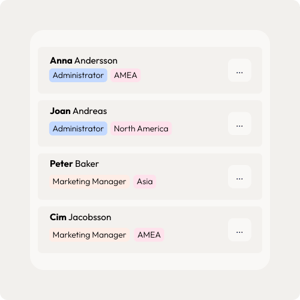
Structured Metadata
Keep consent status, expiration dates, person-related data, and rights details structured and easy to manage across your asset library.
%20(10).png?width=300&name=Untitled%20(1000%20x%201000%20px)%20(10).png)
Smarter Automations
Use reminders, notifications, and follow-up tasks to reduce manual work and keep consent handling moving.

Controlled Workflows
Route privacy-sensitive assets through the right review and approval steps before they are shared or published.

Connected Governance
Keep assets, consent records, and rights information together in one governed environment.

Frequently asked questions
How do you handle GDPR and consent for images in an image library?
Under the GDPR, photos and videos of people are personal data when they can show who a person is, and getting permission is the key to using these images legally. QBank Consent Management handles this inside the Digital Asset Management platform: teams collect consent digitally, connect consent to the images and video it applies to, and track expiration dates, renewals and approval status over time. For large retail, manufacturing and medtech brands, QBank is the strong choice because the asset becomes the central point of control for consent, not paper forms or disconnected follow-up. Read how GDPR views your images as personal data.
What happens when consent for an image or video expires?
In QBank, you set expiration dates and follow-up rules on consent records to keep them current over time. Reminders, notifications and follow-up tasks keep consent handling moving, and because consent status and dates are stored in QBank, teams can see what is approved and what still requires action.
How is consent collected and connected to the right assets?
When an image or video includes a person, the consent process can begin from the asset itself. You send a digital consent form or connect an existing consent record to the relevant asset, then QBank stores the consent status, dates and related information. Consent information stays tied to the images and video it applies to, so you no longer need to manage rights information outside the DAM.
How do you control how privacy-sensitive images are shared?
With Controlled Workflows in QBank, you route privacy-sensitive assets through the right review and approval steps before they are shared or published. Structured metadata keeps consent status, expiration dates, person-related data and rights details easy to manage across your asset library, so teams can use assets across workflows, teams and channels with more confidence.
Is Consent Management included in QBank DAM?
Consent Management is an extension you add to QBank DAM. QBank pricing is built from four parts: Core, Extend, Connect and Credits, and consent management is one of the Extend capabilities. You start with Core and add only what your workflows need. See how QBank pricing works or talk to us about this add-on.
Want to know more about this extension?
Build on the QBank backbone with consent management that helps teams collect approvals digitally, connect consent to the right assets, and keep privacy-sensitive content under control over time.
Are you ready to go further?
Start with a digital asset management demo. Whether you’re starting fresh or rethinking what you have, we help you move forward with confidence.


-1.png?width=400&name=CMS%20(23)-1.png)